How AI Animates a Still Photo
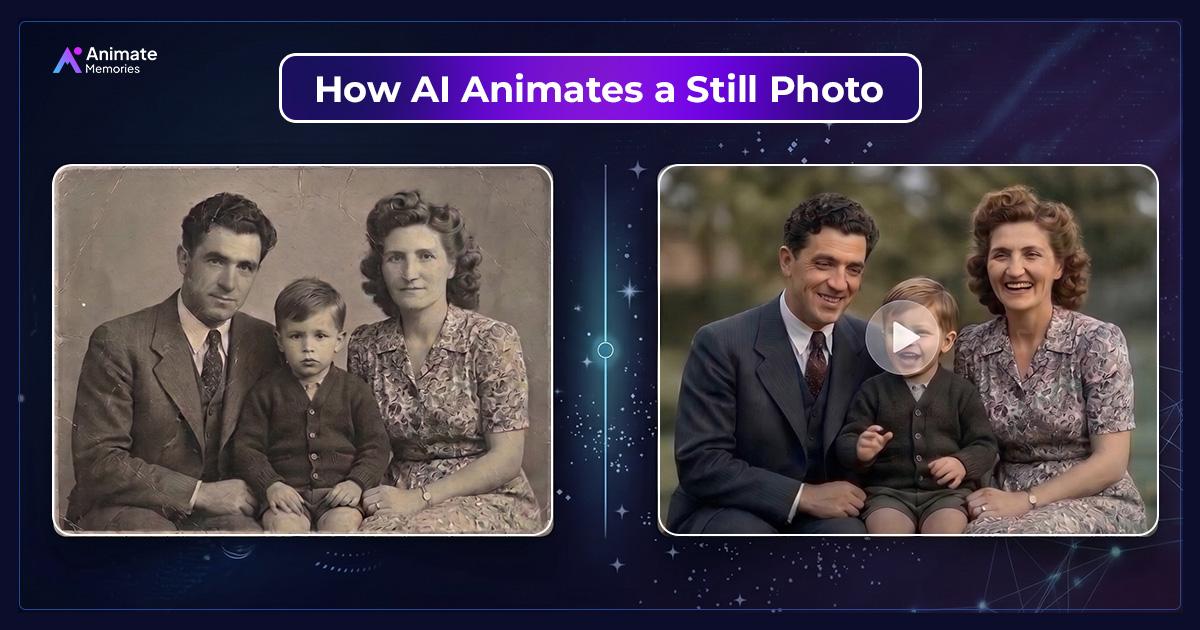
AI analyzes the photograph to identify faces, facial features, and other visual elements. It then uses learned movement patterns and generative models to create new frames showing movements such as blinking, smiling, and head turning.
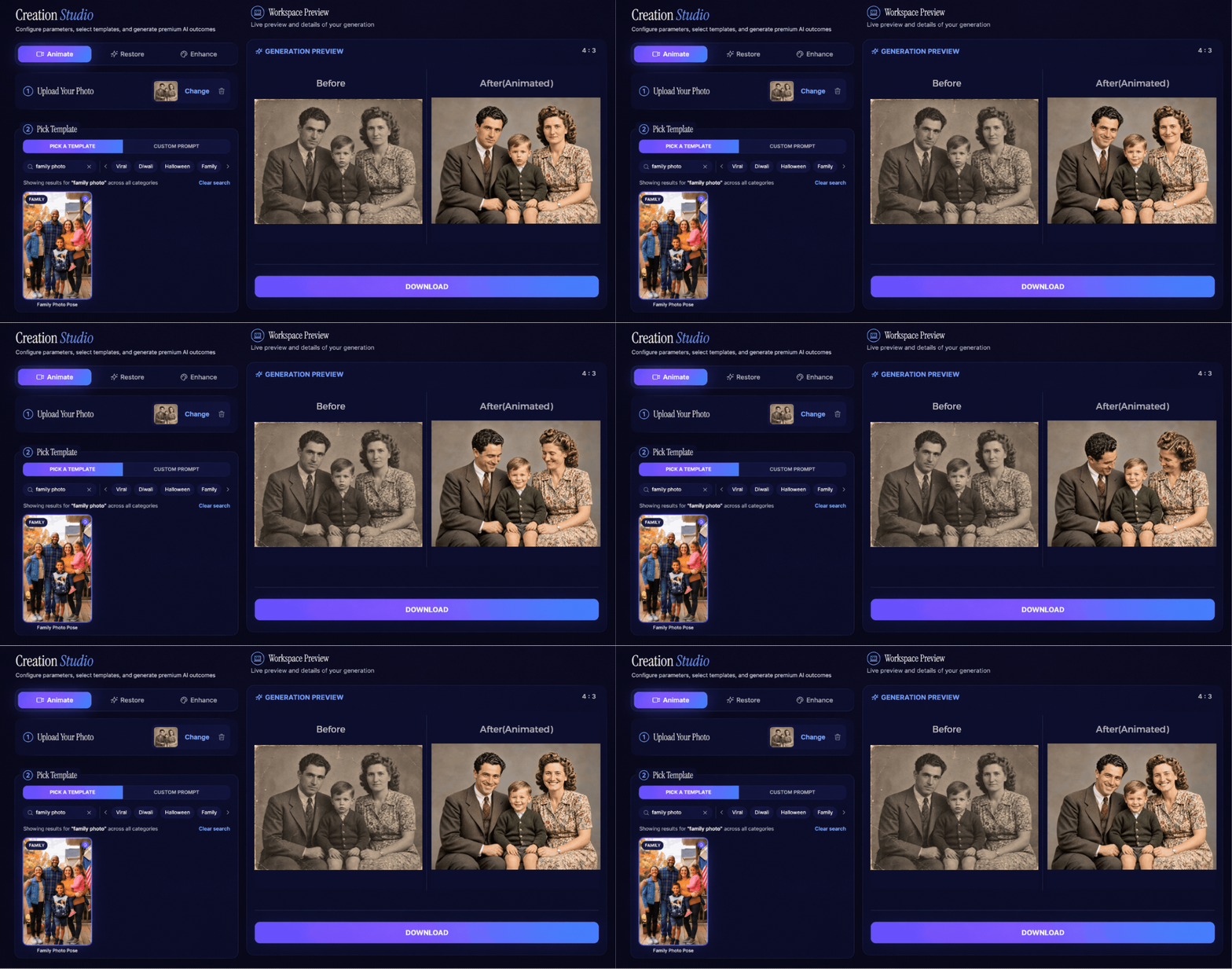
Have you ever looked at an old family photograph and wondered what it would look like if the person in it could smile, blink, or gently turn their head? A photograph captures a single moment, but modern artificial intelligence can use that image to create the appearance of movement.
How AI animates a still photo is an interesting combination of computer vision, machine learning, facial recognition, and motion generation. Instead of simply moving the entire image, AI studies the photograph, identifies important visual details, estimates the structure of the subject, and generates new frames that create a sense of natural movement.
This technology makes it possible to turn ordinary portraits, childhood pictures, and vintage family photographs into short animated videos.
But how does a computer understand a face from just one image? How does it know which parts should move and which should stay still?
Let's explore the technology behind AI photo animation in simple terms.
What Happens When AI Animates a Still Photo?
A traditional photograph contains visual information from one specific moment. It shows a person's expression, position, clothing, surroundings, and lighting, but it does not contain information about what happened immediately before or after the picture was taken.
AI animation works by interpreting the available visual information and generating additional frames that suggest movement.
For example, imagine uploading an old portrait of your grandfather. The original photograph may show him looking directly at the camera. An AI animation system can analyze his facial features and generate a short sequence showing a gentle smile, a natural blink, or a slight head movement.
The generated movement is not recovered from the original photograph. It is a computer-generated interpretation based on learned patterns of human movement.
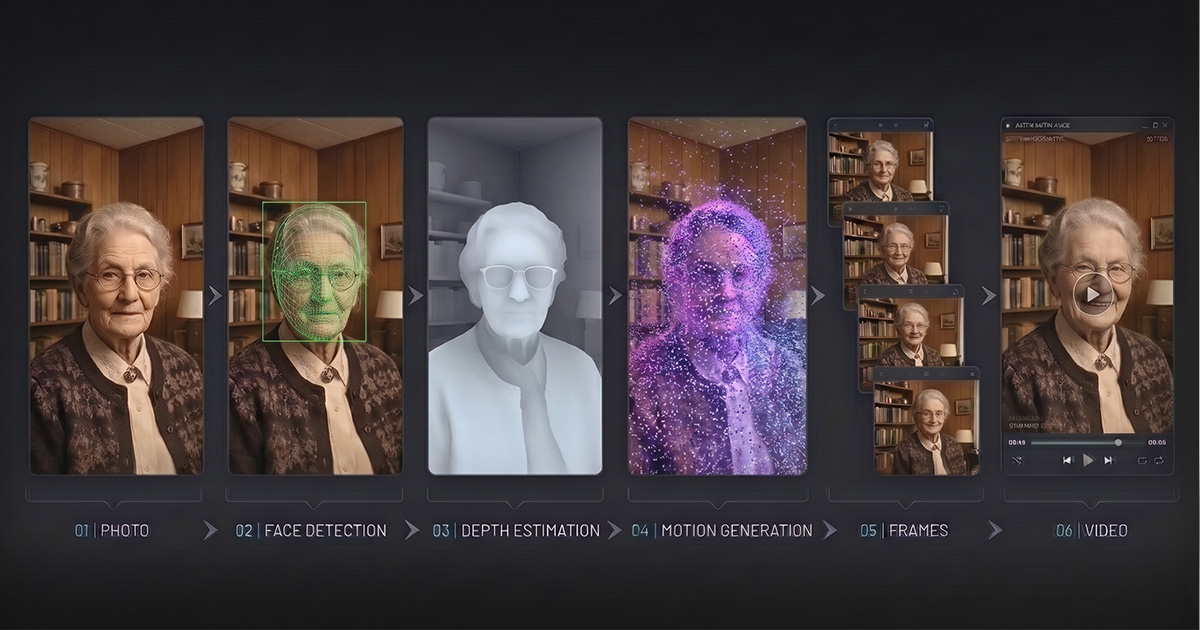
Most AI photo animation systems follow a process involving several important stages:
- Image analysis and facial detection
- Facial landmark identification
- Depth and structural estimation
- Motion generation
- Frame generation and consistency checking
- Final video rendering
Each stage helps the system create movement while keeping the original photograph recognizable.
1. AI First Analyzes the Uploaded Photograph
Before creating any movement, an AI model needs to understand what is actually present in the image.
This process is commonly known as image analysis or computer vision.
When you upload a photograph, the system examines different visual elements, including faces, facial expressions, object boundaries, lighting, colors, and background details.
For portraits, facial detection is particularly important. The AI looks for recognizable facial patterns such as the eyes, eyebrows, nose, mouth, and jawline.
It also examines the position of the head and the direction in which the person is looking.
Think about an old wedding photograph. The AI needs to understand where the bride and groom are positioned, which parts of their faces are visible, and how their bodies relate to the surrounding scene.
This initial analysis helps the system determine which areas can be animated and what kind of movement may look natural.
The quality of this analysis depends partly on the uploaded photograph. A clear portrait with visible facial features usually provides more useful information than an extremely blurry or damaged image.
2. Facial Landmark Detection Helps AI Understand Expressions
One of the most important parts of AI photo animation is facial landmark detection.
Facial landmarks are specific points on a person's face that help a computer understand facial structure and positioning.
These points may include:
- Inner and outer corners of the eyes
- Eyebrow positions
- Nose tip and bridge
- Corners of the mouth
- Chin and jawline
- Facial outline
By identifying these points, the AI can build a better understanding of how different facial areas relate to one another.
For example, when generating a blinking animation, the system needs to understand the position and shape of the eyelids. When generating a smile, it needs to consider the mouth, cheeks, and surrounding facial structure.
These relationships matter because facial movements are connected. A natural smile does not involve only the mouth. It can also change the appearance of the cheeks and eyes.
Facial landmarks give the model useful structural information for generating these changes.
However, not every AI animation tool uses exactly the same detection method. Some systems combine landmark detection with neural networks that learn facial appearance and movement patterns directly from images and videos.
A practical example of this technology is Google's MediaPipe Face Landmarker, which uses machine learning models to detect facial features and estimate 3D facial landmarks. Google's documentation explains how these landmarks help map important areas of the face, including the eyes, lips, and facial contours. Similar facial mapping techniques help AI systems understand facial structure before generating movement.
You can explore the Google MediaPipe Face Landmarker documentation for a technical explanation of how facial landmark detection works.
3. AI Estimates Depth to Create a More Realistic Face
A photograph is two-dimensional, but a human face has three-dimensional structure.
This creates an interesting challenge.
When a person turns their head, different facial areas become visible. The nose changes its position relative to the cheeks, one side of the face may become less visible, and the relationship between the eyes and jawline changes.
A flat photograph does not directly contain all this hidden information.
This is where depth estimation becomes useful.
AI models can estimate the relative depth and shape of facial regions using visual clues such as:
- Facial contours
- Light and shadow
- Nose and cheek positioning
- Eye socket structure
- Facial proportions
- Patterns learned from training images
Some advanced systems also use 3D face representations or neural scene models to understand how a face might appear from slightly different angles.
Imagine a portrait where someone is looking straight at the camera. If the AI generates a gentle head turn, it must create a plausible appearance for facial areas that were less visible in the original photograph.
Depth estimation helps guide that process.
It is important to understand that this is an estimate, not a perfect recovery of the person's actual three-dimensional face. The system generates missing visual information based on patterns it has learned.
This is one reason why subtle movements often produce more convincing results than dramatic head turns.
4. Motion Generation: How AI Decides What Should Move
Once the AI understands the photograph's visual structure, the next stage is generating movement.
This is where motion generation models come into play.
Modern generative AI systems can learn patterns of movement from large collections of video data. They learn how people typically blink, smile, turn their heads, and make small facial expressions.
When an animation is requested, the model uses these learned patterns to generate a sequence of new visual frames.
For example, a simple portrait animation might involve:
Eye movement: The eyes and eyelids change position to create a natural blinking effect.
Head movement: The head may tilt slightly or turn toward another direction.
Facial expressions: The mouth and cheeks may change to suggest a gentle smile.
Body movement: Some systems can generate subtle shoulder or upper-body movement.
Camera movement: The generated clip may include a gentle zoom or camera shift to make the scene feel more dynamic.
The exact movements depend on the model, the animation instructions, and the photograph.
A useful distinction is that AI does not simply move existing pixels from one position to another. Generative models can create new visual details for the frames that were not present in the original image.
This is what makes AI photo animation different from a basic zoom or slideshow effect.
A relevant research example is the First Order Motion Model for Image Animation, presented at NeurIPS 2019 by Aliaksandr Siarohin and his research team. The paper explains how AI can animate a source image using movement patterns from a separate driving video. It uses learned keypoints, local transformations, and an occlusion-aware generator to produce animated frames while preserving important visual information from the original image.
This research provides a useful example of how AI separates appearance from motion when creating an animated image. Read the First Order Motion Model research paper.
5. How AI Keeps the Background Steady During Animation
Have you ever seen an AI-generated video where the person's face moves, but the background also starts bending or changing unexpectedly?
This can happen when the model struggles to maintain visual consistency across frames.
A photograph contains several elements that should behave differently during animation.
For example, in a family portrait:
- The person's face may blink or smile.
- Their head may move slightly.
- Their clothing should generally retain its appearance.
- Furniture and walls should remain in their original positions.
- Objects in the background should not randomly change shape.
AI models use different image-conditioning, attention, segmentation, and temporal consistency techniques to help preserve these relationships.
Some systems identify foreground and background regions separately. Others use temporal information to help maintain the appearance of objects from one generated frame to the next.
This is particularly important when animating old portraits.
If the background changes too much, the animation may no longer feel like the original photograph. Keeping the scene visually consistent helps maintain the identity and atmosphere of the captured moment.
However, background stability is not guaranteed. Complex scenes, overlapping subjects, and unclear image boundaries can still produce unwanted changes.
6. Temporal Consistency Makes Movement Look Continuous
Generating one realistic image is different from generating a realistic video.
A video contains multiple frames, and those frames need to work together.
This is where temporal consistency becomes important.
Temporal consistency means that visual details should remain reasonably stable as the animation progresses.
For example, imagine a person blinking.
The eyes should gradually close and reopen. Their position should not suddenly jump, their facial features should not change randomly, and their appearance should remain recognizable throughout the sequence.
Without temporal consistency, an animation may show:
- Flickering facial features
- Sudden changes in eye shape
- Distorted mouths
- Unnatural head movements
- Changing background details
- Inconsistent clothing or accessories
Modern generative video approaches use different techniques to maintain relationships between consecutive frames.
Depending on the architecture, these may include temporal attention, frame conditioning, motion representations, and consistency constraints.
The goal is to make the generated frames appear as one connected movement rather than a collection of unrelated images.
This is especially important for family photographs, where maintaining recognizable facial details matters more than creating exaggerated motion.
7. From Generated Frames to a Finished Video
After the AI generates the movement, the resulting frames are arranged into a continuous video.
Each frame represents a slightly different point in time.
When these frames are played in sequence at an appropriate frame rate, the viewer sees continuous movement.
For example, an animated portrait might follow this simple sequence:
- The original image is analyzed.
- The model identifies the subject and important facial features.
- The system estimates how the face can move.
- New frames are generated with gradual changes.
- The frames are combined into a video.
- The final animation is prepared for preview and saving.
The result is a short moving portrait created from a single still photograph.
The final quality depends on several factors, including the original image, the AI model, the requested movement, and how consistently the model generates the frames.
What Types of Photos Work Best for AI Animation?
Not every photograph produces the same animation quality.
The AI needs enough visual information to understand the subject and generate believable movement.
Here are some practical tips for choosing a suitable photograph.
1. Choose a photograph with a clear face
Portraits with visible facial features generally provide a better starting point. Front-facing or slightly angled faces are often easier to animate.
2. Use a good-quality image
Higher-resolution photographs can provide more facial details for the model to analyze. If you have a printed photograph, create a clear digital scan before uploading it.
3. Avoid excessive blur
Very blurry images can make it difficult for AI to identify facial features accurately.
4. Restore damaged photographs first
If your old family picture has scratches, faded areas, or damaged facial details, consider restoring it before animation.
You can explore AI photo restoration to understand how damaged photographs can be improved.
5. Start with gentle movements
A soft smile, natural blink, or slight head movement often looks more believable than an exaggerated action.
Can AI Animation Recreate What Actually Happened in a Photograph?
No. This is an important distinction.
AI photo animation creates new movement based on patterns learned from other images and videos. It does not know what the person was actually doing before or after the photograph was taken.
For example, if you animate a photograph of your grandmother, the AI might generate a smile or head movement.
However, that movement is a creative interpretation, not a recording of her actual expression at that moment.
The original photograph remains the authentic record of the past.
The animated version simply offers another way to experience and share that memory.
This distinction is particularly important when working with historical photographs, family archives, or pictures of loved ones.
How Animate Memories Makes Still Photos Move
Understanding the technology behind AI animation makes it easier to appreciate what happens when an old photograph becomes a moving portrait.
With Animate Memories, you can animate old photos and restore them without needing professional video-editing experience.
The platform brings together tools designed to help people preserve and creatively revisit their photographs.
You can:
- Upload an old family photograph or portrait.
- Choose an available animation template or describe the movement you want.
- Generate a short animated video.
- Restore or enhance damaged photographs before animation when needed.
- Preview and save the result.
Whether you want to revisit a childhood photograph, animate an old wedding portrait, or create a moving version of a family memory, the process offers a simple way to explore AI-generated motion.
You can also read our guide, What Is AI Photo Animation?, to learn more about the technology, templates, and ways to get better results.
Final Thoughts
The technology behind AI photo animation combines several processes that work together. Facial detection helps identify important features, depth estimation provides clues about three-dimensional structure, and motion generation creates new frames that suggest natural movement.
Temporal consistency then helps keep the animation visually connected from beginning to end.
Although AI cannot recover the actual movements that happened when a photograph was taken, it can create a new interpretation of that moment.
For families with old photographs stored in albums, boxes, or digital folders, this technology offers an interesting way to revisit meaningful memories.
A photograph may capture only one moment, but AI gives you another way to experience it.
Ready to see your photographs move? Open the Animate Memories Studio and turn a still photograph into a short animated memory. New users get 4 free credits, with no credit card required.
Frequently Asked Questions
1. How does AI animate a still photo?
AI analyzes the photograph to identify faces, facial features, and other visual elements. It then uses learned movement patterns and generative models to create new frames showing movements such as blinking, smiling, and head turning.
2. How does AI know which parts of a face should move?
AI uses facial detection, landmark identification, and learned patterns of human expressions to understand facial structure. These details help the model generate movements around the eyes, mouth, cheeks, and other facial areas.
3. Does AI create a 3D model from a 2D photograph?
Some advanced AI animation systems use 3D facial representations or depth estimation to understand the structure of a face. However, not every tool creates a complete 3D model. Many systems use learned visual representations to generate plausible movement.
4. Why does the background sometimes move during AI photo animation?
AI may struggle to distinguish foreground subjects from background objects, especially in complex photographs. Changes in image boundaries, overlapping elements, and generated frames can cause unwanted movement or distortion.
5. What is temporal consistency in AI animation?
Temporal consistency refers to maintaining visual stability between consecutive video frames. It helps ensure that facial features, clothing, and background elements do not change unexpectedly while the subject moves.
6. Can AI animate an old or damaged photograph?
Yes, AI can animate many old photographs, but the results depend on image quality and the visibility of facial features. Restoring scratches, fading, and blur before animation may improve the starting image.
7. Can AI make a person smile or blink in an old photo?
Yes. AI photo animation can generate movements such as blinking, smiling, and gentle head movements. These are newly generated expressions rather than movements recovered from the original photograph.
8. Does AI photo animation change the original photograph?
AI animation generates new frames to create a video. The original photograph can remain unchanged as a separate file. It is always a good idea to keep a backup of important family photographs.
9. Is AI photo animation the same as a slideshow?
No. A slideshow displays photographs with transitions, zooms, or other visual effects. AI photo animation generates new visual frames that create the appearance of movement within the subject itself.
10. Can I animate family portraits with Animate Memories?
Yes. Animate Memories lets you upload photographs and explore AI-generated movements using available templates or custom prompts. You can also explore photo restoration features for improving older or damaged images before animation.