How to Restore Old Christmas Photos and Preserve Cherished Family Memories
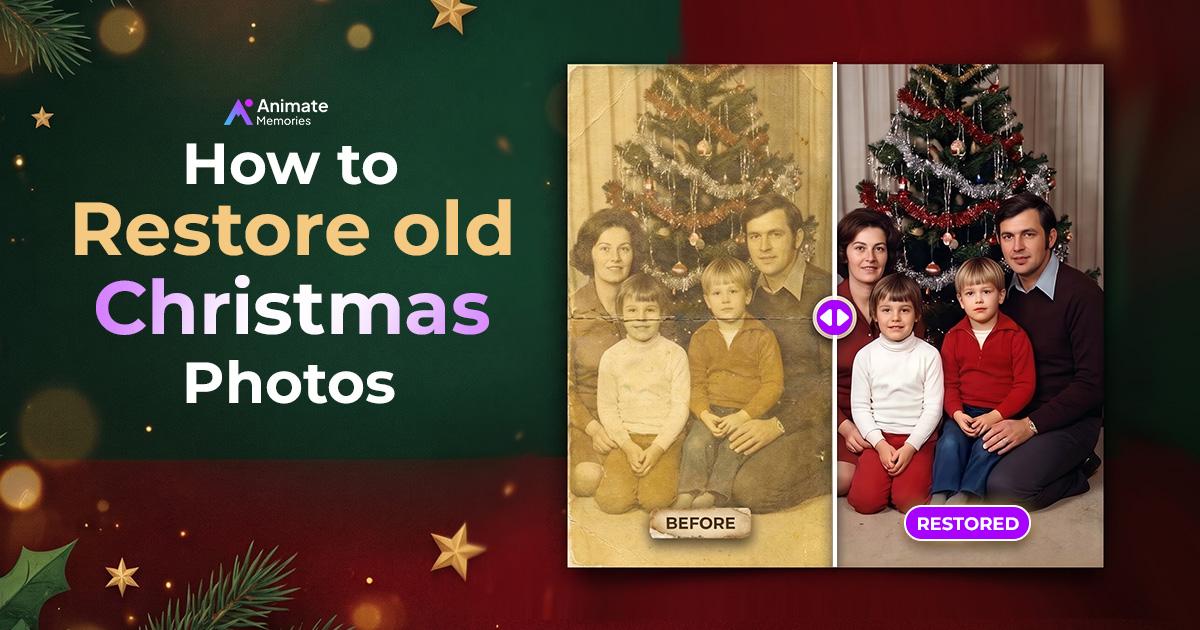
Christmas photographs often hold some of our most meaningful family memories. A childhood picture beside the Christmas tree, a photograph of grandparents opening presents, or an old family portrait from a holiday gathering can bring back moments that might otherwise be forgotten.
Over time, however, printed photographs can become faded, scratched, stained, or torn. Colors may change, important details may become difficult to see, and some pictures may even begin to deteriorate because of improper storage.
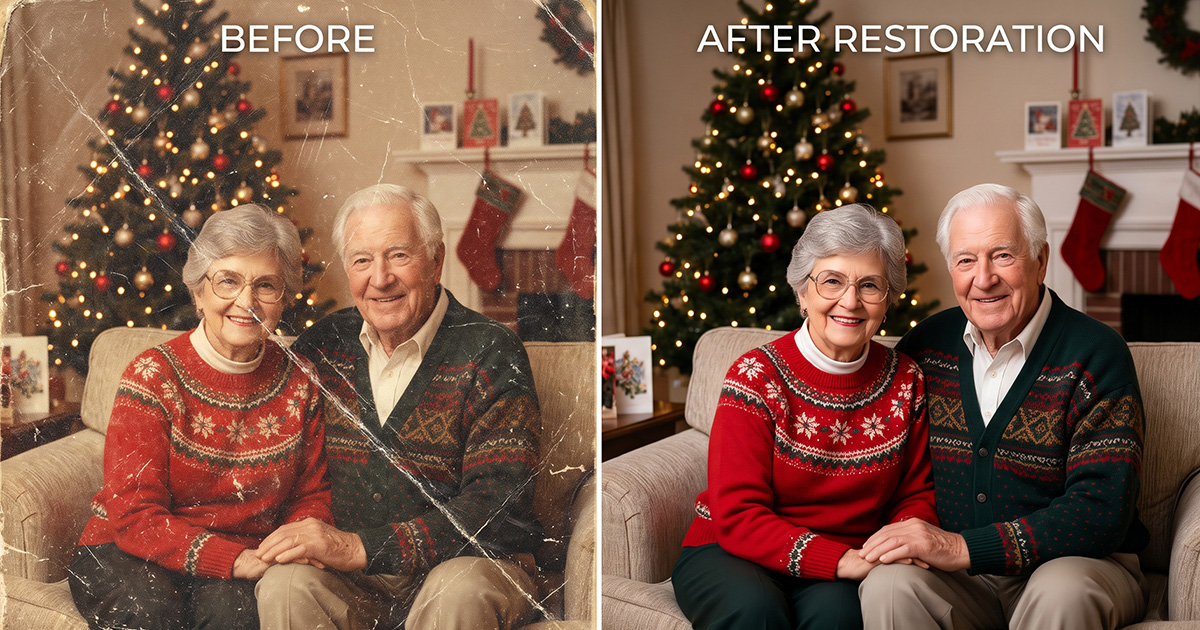
The good news is that restoring old Christmas photos can help improve their appearance and make them easier to preserve and share. With digital photo restoration, you can create improved copies of treasured holiday pictures without making changes to the original prints.
In this guide, you will learn how to restore old Christmas photos, understand common types of photo damage, prepare pictures for AI restoration, and preserve your family's holiday memories for future generations. If you are new to restoration, our guide to restoring old photos online with AI covers the basics.
Why Old Christmas Photos Deserve to Be Preserved
Christmas photographs capture more than decorations, gifts, and celebrations. They show the people, traditions, and little moments that make each family's holiday special.
An old photograph of children opening presents may bring back memories of childhood excitement. A picture of grandparents sitting beside the Christmas tree may remind younger family members of relatives they never had the opportunity to meet.
These photographs can also help families understand how their traditions have changed over the years.
Preserving old Christmas pictures can help you:
- Remember grandparents, parents, and other loved ones.
- Revisit childhood Christmas celebrations.
- Share family stories with younger generations.
- Keep photographs of important holiday traditions.
- Create a digital collection of family memories.
Even a faded or damaged photograph can hold an irreplaceable story. Restoring its appearance can make that memory easier to revisit without replacing the original.
Common Problems Found in Old Christmas Photographs
Before restoring an old Christmas picture, it helps to understand what has happened to the image. Different types of damage may require different restoration approaches.
1. Faded Colors and Discoloration
Older color photographs may lose their original appearance over time. Some develop a yellow or reddish tint, while others become pale or lose contrast.
This can make faces, clothing, decorations, and background details difficult to distinguish.
2. Scratches and Surface Marks
Photographs stored without protective covers may develop scratches, fingerprints, dust marks, and other surface imperfections.
Even small scratches can become noticeable when they cross an important part of a face or an object.
3. Creases and Fold Marks
Old photographs may become folded or bent while being stored in boxes and albums. These creases can leave visible lines across the image and sometimes damage important details. For a full walkthrough, see restoring creased and water damaged photos step by step.
4. Water Damage and Stains
Moisture can leave marks, discoloration, and stains on printed photographs. In severe cases, it can cause the paper to warp or parts of the image to become difficult to recognize. If a print is torn rather than stained, read how to restore torn photos.
5. Blurry or Low-Quality Images
Some older photographs were originally captured with limited camera technology. Others may have lost detail because of repeated copying, scanning, or compression.
Digital enhancement may improve their appearance, but it cannot always recover details that are completely missing.
How to Restore Old Christmas Photos with AI
AI photo restoration can help improve the appearance of old photographs by analyzing visible image details and processing areas affected by common imperfections.
Here is a practical process you can follow to prepare and restore your Christmas pictures.
Step 1: Find and Organize Your Old Christmas Photos
Start by collecting photographs from family albums, storage boxes, frames, and digital folders.
Look for pictures that capture special holiday moments, such as:
- Children opening Christmas presents.
- Grandparents celebrating with the family.
- Old Christmas tree decorations.
- Family dinners and holiday gatherings.
- Childhood portraits taken during Christmas.
- Wedding or anniversary celebrations around the holiday season.
Organize the photographs into groups so that you can decide which ones need restoration first.
If possible, ask older family members to identify the people, locations, and approximate years shown in the pictures. Their knowledge can help preserve the stories behind each image.
Step 2: Digitize the Original Photograph
Before using an AI restoration tool, create a digital copy of your printed photograph.
A flatbed scanner is a useful option because it captures the image without requiring repeated handling. You can also use a camera or scanning app if you have suitable lighting and can avoid reflections.
Keep these tips in mind:
- Place the photograph on a flat surface.
- Use even lighting.
- Avoid glare and harsh shadows.
- Capture the entire photograph.
- Save the highest-quality digital copy available.
Do not attempt to clean a fragile photograph with household chemicals or force apart photographs that have stuck together. For valuable or severely damaged originals, consider professional conservation advice. Our guide on how to scan and digitize fragile tintypes and glass negatives has more tips for delicate originals.
Step 3: Identify the Areas That Need Restoration
Open the digital copy and review the image carefully.
Look for fading, scratches, creases, stains, missing sections, and blurry areas. Make a note of the problems that affect the photograph most.
For example, one Christmas portrait may mainly need color correction, while another may require attention to scratches and water stains.
Understanding the condition of the image helps you evaluate the restoration result more realistically.
Step 4: Upload the Image to an AI Photo Restoration Tool
Choose an AI photo restoration tool and upload your digital photograph.
In Animate Memories, open the Studio and choose Restore, then upload your scan. The credit cost is shown before you start.
Depending on the image and available restoration features, AI processing may help improve clarity, reduce certain visible imperfections, and enhance faded photographs.
The result depends on the original image quality and the extent of the damage. AI tools may also interpret unclear details, so the restored image should always be reviewed against the original.
Step 5: Review the Restored Christmas Photo
Once restoration is complete, compare the result with your original digital scan.
Pay particular attention to faces, clothing, Christmas decorations, and other details that are important to the memory.
Check whether the image still looks like the original photograph. If an AI tool has changed facial details or introduced visual inconsistencies, you may prefer the original or try a different restoration approach.
The goal is to improve the photograph while respecting the memory it represents.
How to Restore Old Christmas Photos
Step 6: Save and Back Up Your Restored Images
Save the restored photograph as a separate file. Do not overwrite your original scan.
Use descriptive file names that include the people, occasion, or approximate year. For example, Grandparents-Christmas-1980.
Keep backup copies in secure digital storage. You can also organize photographs into folders by year, family member, or occasion to make them easier to find later.
How to Preserve Restored Christmas Photos for Future Generations
Restoring a photograph is only one part of preserving family history. You should also protect the original prints and keep the information connected to each image.
Store Original Prints Carefully
Keep printed photographs away from direct sunlight, excessive moisture, and extreme temperatures. Use suitable protective photo sleeves or archival-quality albums.
Handle fragile photographs carefully and avoid writing directly on their surfaces.
Create a Digital Family Archive
Organize restored photographs and original scans in a digital collection. Create folders for different generations, occasions, and family members.
This makes it easier to find specific Christmas memories and share copies with relatives.
Add Names, Dates, and Stories
A photograph becomes more meaningful when future generations know who is in it and why the moment mattered.
Add names, approximate dates, locations, and short descriptions wherever possible. Ask relatives to share stories about the people and celebrations shown in the pictures.
Share Copies with Family Members
Consider sharing digital copies with siblings, cousins, grandparents, and other relatives. Keeping copies in more than one place can reduce the risk of losing an important family photograph.
For more ideas on preserving meaningful family memories, read our guide to remembering loved ones on Thanksgiving through old photo restoration.
Creative Ways to Use Restored Christmas Family Photos
Once your photographs have been restored, you can enjoy them in different ways during the holiday season.
Create a Christmas Memory Slideshow
Combine restored photographs from different years into a digital slideshow. Arrange them chronologically to show how family celebrations and traditions have changed over time.
Make a Family Photo Album
Print selected restored images and organize them into a Christmas family album. Include names, dates, and short descriptions to help preserve the stories behind each photograph.
Share Childhood Memories with Relatives
Send restored childhood photographs to siblings, cousins, or grandparents. A familiar picture can become a starting point for conversations about earlier Christmas celebrations.
Create a Digital Memory Collection
Keep restored images alongside original scans, family notes, and photographs from more recent celebrations. You can add new memories each year and gradually build a family archive.
Explore AI Photo Animation
After restoring a photograph, you may also want to explore AI photo animation. This process generates subtle movement from a still image and can create a short animated version of a suitable family portrait.
The animation is an AI-generated interpretation, not original video footage of the moment. If you are interested in this process, read our guide on how to animate old Christmas photos.
Frequently Asked Questions
1. How can I restore old Christmas photos?
Scan or photograph the original print, then upload the digital copy to an AI photo restoration tool such as Animate Memories. In the Studio, choose Restore, review the result against the original and save it as a separate file.
2. Can AI restore faded Christmas photographs?
AI photo restoration tools can help improve the appearance of faded photographs by enhancing visible details and adjusting the image. Results depend on the original photograph's condition and the amount of detail that remains.
3. Can I restore scratched or torn Christmas photos?
Some scratches and visible imperfections may be improved with digital restoration. However, photographs with large missing sections or severe physical damage can be more difficult to restore accurately.
4. Should I scan old Christmas photos before restoring them?
Yes. Digitizing a printed photograph gives you a copy to work with while keeping the original print safe. A flatbed scanner is a useful option for capturing detailed digital copies.
5. Can I restore black-and-white Christmas photos?
Yes. Black-and-white photographs can be digitally enhanced to improve their appearance. Restoration and colorization are different processes, so adding color is optional and should be treated as a separate creative choice.
6. How do I preserve restored Christmas photos?
Save the restored image separately from the original scan, keep backup copies in secure storage, and organize the files with names and dates. Store original printed photographs in suitable protective materials.
7. Can I animate an old Christmas photo after restoring it?
Yes. You can use a suitable restored photograph as the starting image for AI photo animation. The animation generates new movement from the still image and is not real footage of the original event.
8. What is the best format for saving restored family photos?
For an archival master copy, use a high-quality format such as TIFF when your workflow supports it. JPEG can be convenient for everyday sharing. Keep the original scan and restored master separately.
9. Can heavily damaged family photographs be fully restored?
Not always. The outcome depends on how much original visual information remains. AI may interpret missing or unclear details, so a restored photograph should not be treated as a guaranteed exact reconstruction.
Give Your Old Christmas Photos a New Beginning
Your family's Christmas photographs deserve to be preserved, not forgotten in old albums or storage boxes. From faded childhood pictures to treasured portraits of grandparents, every photograph holds a story worth keeping.
With Animate Memories, you can explore AI photo restoration and improve the appearance of your cherished family pictures. Start with a digital copy of your favorite Christmas photograph and create a version that is easier to preserve and share. New users get 4 free credits, with no credit card required.
Restore Your Old Christmas Photos Today
Preserve the photographs. Remember the stories. Share the memories.